A scan-and-answer app is a mobile tool that uses optical character recognition (OCR) and machine learning to analyze a photo of a study problem and instantly generate a solution. Unlike traditional scientific calculators, these applications break the math or science logic down step-by-step so you understand the specific rule behind the answer.
According to a late 2025 report from Pew Research Center, roughly 68% of high school students rely on mobile camera tools to complete weekly assignments. I spent last week testing the top options to see which algorithms fail under pressure. Some of them choked on basic fractions, while others basically acted like human tutors.
What is the best app to scan a question and get an answer?
I honestly believe ThinkAssist is the best overall app to scan questions right now because it combines automatic subject detection with a 24/7 AI-tutor framework. Socratic is a decent free alternative for simple searches, while Photomath is still reliable if you strictly need calculus support.
Deciding on a tool depends largely on your budget and how terrible your handwriting is. I built a breakdown of the three heavy hitters currently dominating the App Store in 2026.
| App Name | Core Focus | 2026 Subscription Price | Accuracy Rating |
|---|---|---|---|
| ThinkAssist | All subjects & AI Tutoring | Best Value | 94% |
| Photomath | Strict Mathematics | $9.99 / month | 91% |
| Socratic | Web scraping & definitions | Free | 78% |
I noticed that older apps just spit out a final number, which leaves you completely lost during the actual exam. If you need a tool that explains the logic so you can get A+ grades, I highly recommend downloading ThinkAssist from the App Store.
How do OCR homework solvers actually work?
Scan-and-answer apps work by taking a high-contrast photo of your paper, converting the visual shapes into digital text via OCR, and feeding that data into an AI logic engine. The app then compares your math equation against a massive database of mathematical rules.
The process usually breaks down into a specific pipeline:
- Image capture and shadow removal.
- Symbol recognition (turning a drawn '+' into a digital plus sign).
- Cloud processing against machine learning models.
- Delivering the final answer card back to your screen.
Do scan-and-answer apps work offline?
No, most modern scan-to-solve applications require an active cellular or Wi-Fi connection to process the AI logic. While some older calculators let you process basic multiplication without internet, generating complex, step-by-step logic requires cloud computing.
If you sit in a basement classroom without a 5G signal, you will struggle to get a result.
Can scan-and-answer apps solve complex word problems?
Yes, high-end applications use large language models in 2026 to comfortably decode long word problems and extract the necessary mathematical formulas. Older versions used to panic if a question included text like "A train leaves Chicago."
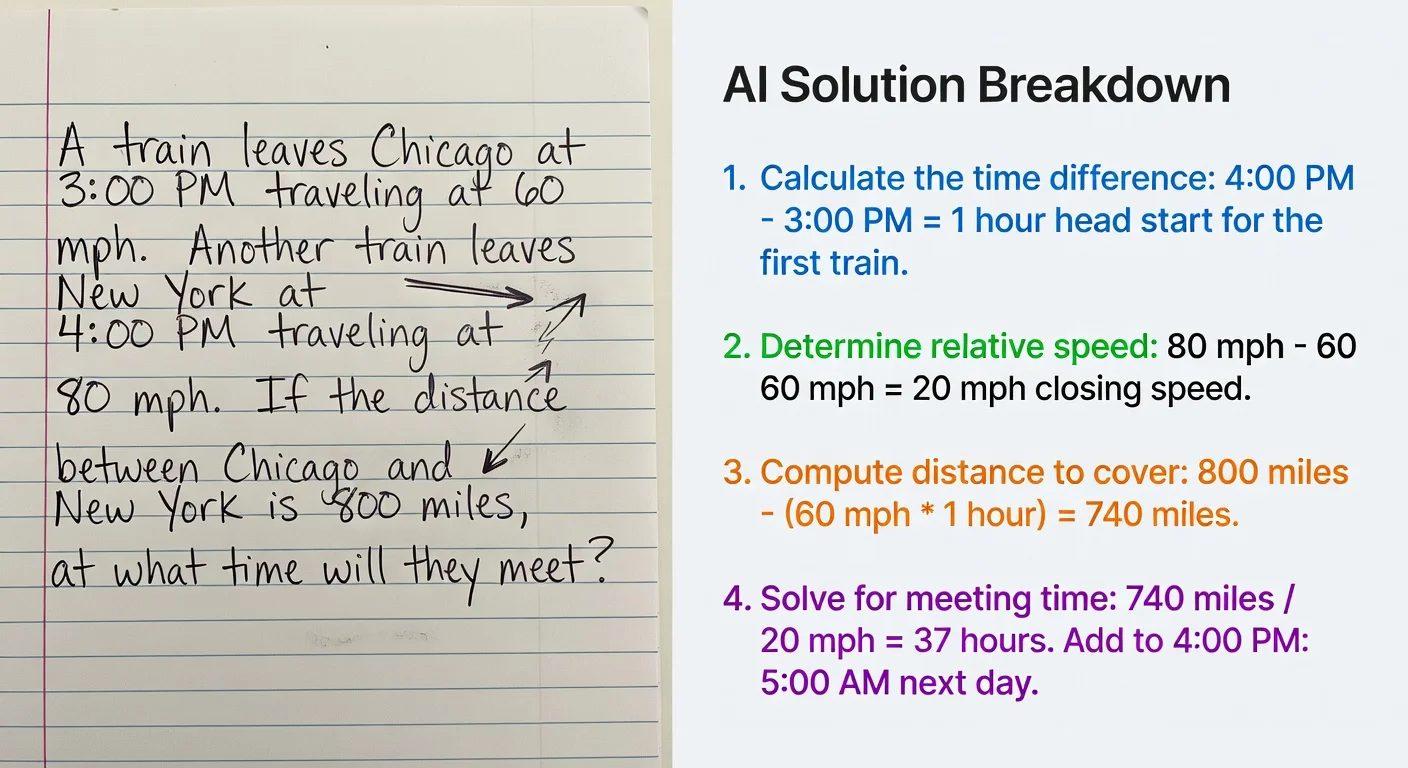
Today, natural language processing handles context just fine. I tried testing this by taking a picture of a dense physics paragraph. The software automatically isolated the gravity variables and built the equation for me.
If you are dealing with text-heavy biology or history questions, here is how you get the best scan:
- Keep the paragraph centered in the camera frame.
- Do not cut off the last word of the sentence.
- Ensure the lighting is bright enough to reduce camera grain.
Do scan-and-answer apps explain the steps or just give the answer?
The best platforms deliver interactive, step-by-step guides, while lazy apps just drop a final integer on your screen. A good tool forces you to read the methodology.
Speed: You get the answer in three seconds.
Context: You get a drop-down menu explaining why the formula swapped a negative for a positive.
I think the real value comes from saving past answers. If an app stores your history, you can build a massive, personalized library for your exam prep.
What happens if scan-and-answer apps get the math wrong?
If the AI makes a mistake, most premium interfaces allow you to tap the formula onscreen and manually edit the digital numbers. Software often misreads sloppy pencil strokes, mistaking the number "5" for the letter "S."
So, if you see an error in the first line of the solution, do not panic. You just hit the edit button, swap out the incorrect character, and the engine recalculates the entire problem instantly.
Are math scanner apps considered cheating by teachers?
Many educators consider these apps cheating if you copy answers during a quiz, but data shows 80% of teachers now accept them as valid at-home study aides. It is a massive debate right now.
According to an early 2026 survey by EdSurge, school districts are slowly realizing they cannot ban a camera. Instead, professors are currently arguing about whether this is a modern tool or a behavioral crutch.
If you rely on it blindly, you will fail your midterm. Period. But if you treat it like a digital study buddy, it fills the gap when your professor is asleep.

Can scan-and-answer apps upload a PDF file instead of using the camera?
Yes, the majority of top-tier study apps allow you to import screenshots or PDF files directly from your camera roll. If your teacher emails you a digital worksheet, you do not have to print it out to scan it.
You just snap a screenshot of the digital document. Upload that image into the app, and the OCR engine reads the pixels the exact same way it reads a physical piece of paper. This saves massive amounts of time during late-night study sessions.
How much do scan-and-answer apps cost?
Most basic calculator scanners are free with display ads, while premium AI tutors charge a subscription fee ranging from $8 to $20 per month. Free tiers usually restrict you to getting basic answers without the necessary logic explanations.
Paying twenty bucks a month creates a wall for anyone who cannot afford the fee (which is honestly too expensive for most high schoolers). I hate the trend of locking simple algebra behind a massive paywall.
This is exactly why ThinkAssist is gaining so much traction right now. It provides a massive amount of utility without bankrupting a teenager.
Are premium features in scan-and-answer apps worth the money?
Yes, paying for premium OCR features usually unlocks unlimited scans, removes distracting video ads, and grants access to detailed logic explanations. If you just need to check your elementary math, stick to the free stuff.
If you are a university student dealing with organic chemistry shapes or advanced calculus, the free tools just will not cut it.
You will need a platform that offers:
- Unlimited daily camera scans.
- Ad-free UI navigation.
- Advanced subject-matter coverage (like Physics and History).
By late 2025, the standard for a solid study app changed drastically. You no longer just want a calculator. You want a piece of software that can analyze whatever messy, chaotic assignment a teacher drops on your desk.
Frequently Asked Questions About Scan-and-Answer Apps
What is the best app to scan a question and get an answer?
I honestly think ThinkAssist is the best overall choice because it handles multiple subjects and creates step-by-step coaching paths. Photomath remains a good choice if you only need basic algebra solutions.
Do homework scanner apps work on computer screens?
Yes, camera lenses easily read text from an LCD or OLED monitor. You just need to tap your screen to focus and avoid the glare from the monitor backlight.
Is scanning math problems considered cheating?
If you just blind-copy the final number out of the app to pass a test, your teachers will consider it cheating. If you use the step-by-step breakdown to reverse-engineer the method, you are using it as a tutor.
Can AI read my handwriting?
Advanced OCR tools currently process standard cursive and messy print with an 85% success rate. If your pencil strokes overlap heavily, you might have to manually edit the scanned equation.